
Tap to Pay - Anonymous Constituent Credentials
What is this for?
When someone uses Tap to Pay, they might just tap their phone, watch, or card and walk away—no name, no email, no receipt. Fully Anonymous.
Since Tessitura needs a record attached to every order, Donate2 uses these credentials behind the scenes to log in and we put those "Anonymous" gifts onto a house account (like Anonymous
How It Works
- A patron taps to pay: During a Tap to Pay transaction, the patron opts out of receiving a receipt.
- No record to match: Because no contact details (like name or email) are collected, the gift cannot be matched to an existing constituent.
- Automatic posting: Donate2 logs into Tessitura behind the scenes using these credentials and credits the contribution directly to your organization’s designated "Anonymous" constituent record.
Setting Up Credentials
Before enabling anonymous donation workflows, you will need to set up a dedicated constituent record in Tessitura (e.g., "Anonymous Donor" or "Anonymous").
- In your 2Account Web App, navigate to the Tessitura menu.
- Select the LIVE Environment
- Scroll and open the Configuration collapsible
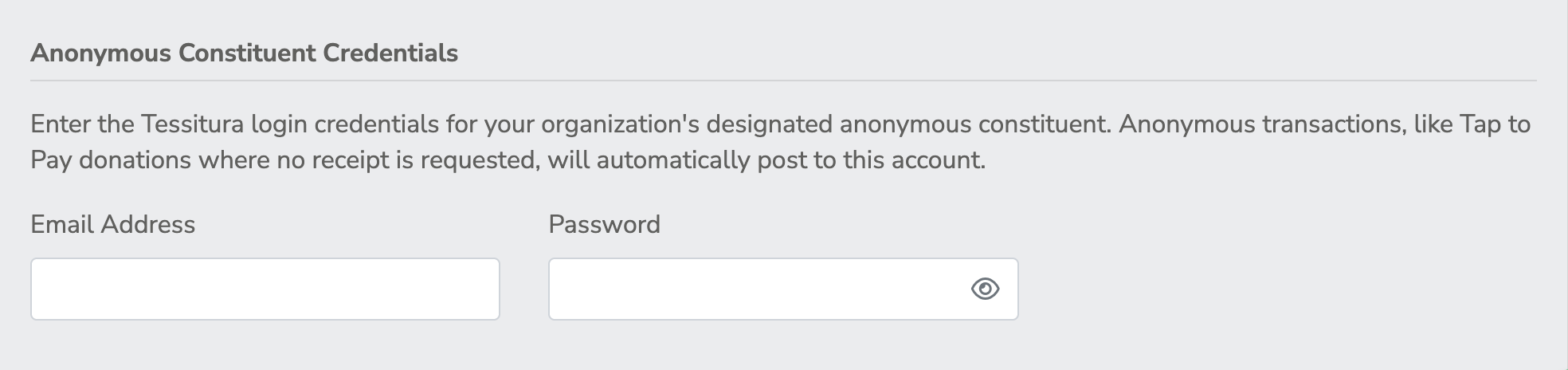
- Scroll to Anonymous Constituent Credentials.
- Enter the Email Address and Password associated with your house anonymous constituent web account in Tessitura.
Note
Make sure this anonymous user is active in Tessitura and set up with the right Login Type!
Frequently Asked Questions
Do I need this if I don't use Tap to Pay?
If none of your active forms or features allow patrons to skip contact information, this step is optional. However, we recommend configuring it so any future anonymous workflows work seamlessly.
What happens if these credentials are incorrect or missing?
If an anonymous transaction occurs and no valid credentials are on file, the payment will still process through your payment gateway, but the order won't automatically post to Tessitura. You'll need to manually attribute the transaction.